The Omnichannel Illusion: Why Retail Projects Crash and Burn
# Executive Summary
Omnichannel projects often fail due to a mix of technical and organizational shortcomings. High failure rates (over 60% of digital transformations) are driven not by choosing the wrong platform, but by strategic plans disconnected from reality. Common pitfalls include siloed data, fragmented teams, and legacy systems that cannot “talk” to each other. Integration gaps across ERP, e-commerce, marketplaces, stores, and supply chains lead to inconsistent pricing, inventory errors, and poor customer experience. This report analyzes the key failure causes (with real cases like Sears), and offers mitigation strategies: robust integration architectures (using middleware or iPaaS), unified systems-of-record, clear processes, and strong change management. We provide implementation checklists, recommended inventory-sync schedules (for high-volume online vs. offline-heavy scenarios), KPIs (e.g. fill rate, inventory accuracy, return cost), sample integration diagrams, and a comparison of integration approaches (pros/cons/cost/complexity/time-to-implement).
## Key Causes of Omnichannel Failure
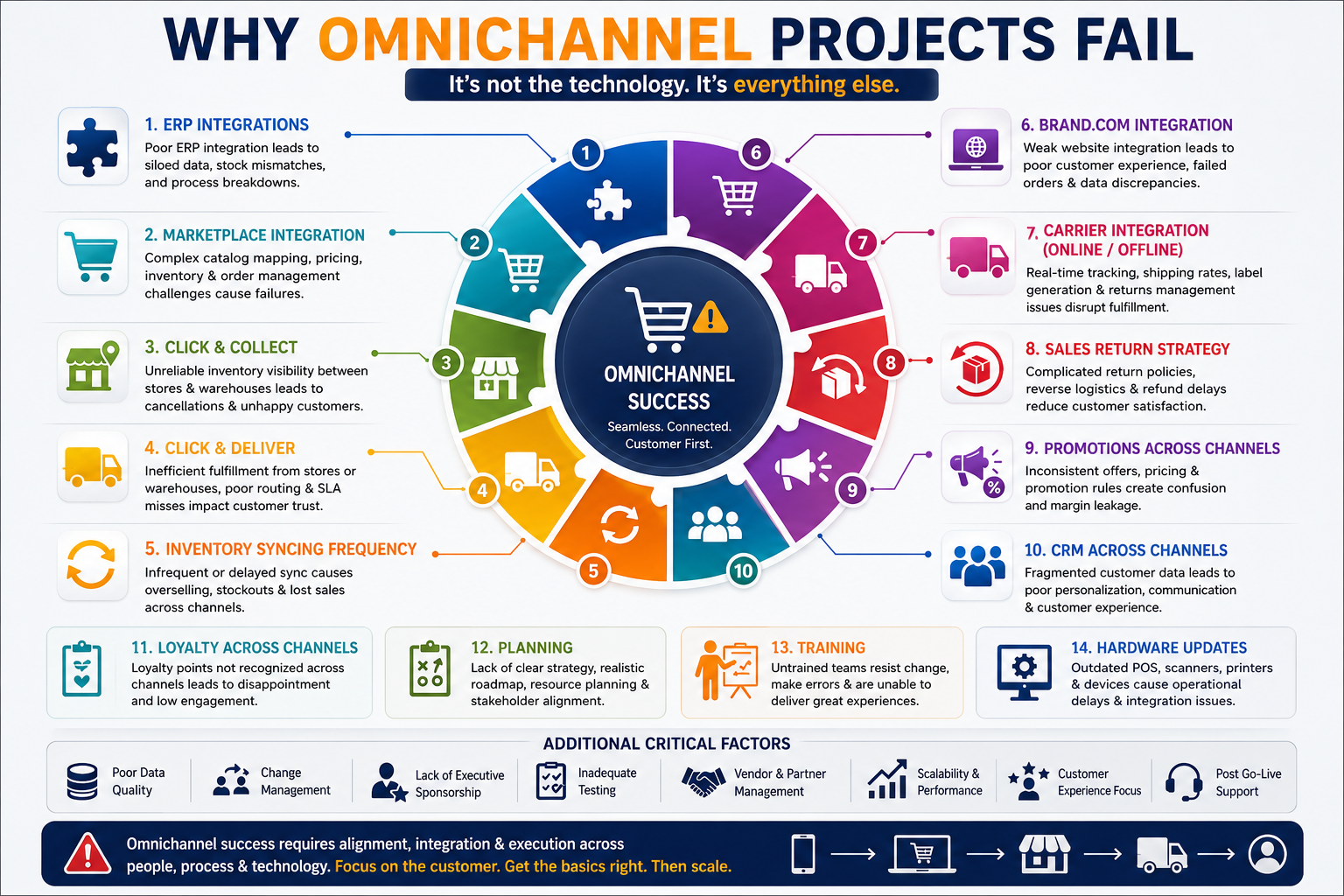
- Strategic and Organizational Misalignment: Projects often underestimate complexity and overpromise outcomes. Without a clear omnichannel vision, companies build “connected” point-to-point links instead of a unified architecture. For example, 60%+ of digital transformations fail when plans ignore legacy constraints. Teams may lack dedicated ownership (no “omnichannel manager”), leading to conflicting channel goals. Silvation of roles (e.g. separate store, e‑com, loyalty teams) creates misalignment. Insufficient change management and training is endemic: studies list *“insufficient training of users, lack of planning, and poor communication”* as top ERP/omni failure factors.
- Data Silos and Incomplete Integration: True omnichannel requires a single source of truth for inventory, orders, products, pricing, and customers. Failures arise when systems do not share data or do so incorrectly. For instance, unsynchronized pricing across channels causes customer mistrust; inconsistent order data means a buyer might see different order histories online vs. in-store. A study found “inefficient legacy systems (21%) and tools difficult to integrate (20%)” are the biggest omnichannel barriers. In practice, real-time inventory sync is often impossible at scale; neglecting eventual consistency leads to overselling. Lack of automation forces manual data re-entry (e.g. CSV imports or rekeying orders), which is error-prone and unscalable.
- Legacy Systems and Technical Debt: Many retailers rely on old ERP or POS platforms that were not built for omnichannel. These systems resist modern APIs or the high throughput of e-commerce. For example, *directly* connecting a POS system to an online store “is a tempting shortcut and a long-term mistake” – as soon as a new channel (like a marketplace) is added, the brittle point-to-point link breaks. Instead, best practice is to use the OMS (Order Management System) as the central broker: every channel (web, POS, marketplace) reads inventory from the OMS and writes orders to it. Without this architecture, adding new channels requires constant rewrites. Similarly, hard-coding a single marketplace’s product format causes endless rework: a *“marketplace integration architecture that hardcodes any one marketplace’s data model will need to be rewritten for every additional channel”*.
- Inventory and Fulfillment Errors: Omnichannel means fulfilling orders from stores and warehouses interchangeably (ship-from-store, click-and-collect). This demands up-to-the-minute inventory accuracy. When stock is not visible or synced across locations, systems promise what doesn’t exist. NetSuite warns, *“if you don’t know what you have where, you can’t offer alternatives and will inevitably lose sales”*. Disparate systems often lead to phantom inventory or oversells. For offline-heavy retailers (e.g. many in-store pickups), using only event-driven sync misses stock decrements (e.g. a product sold in store). Without nightly reconciliation, *“inventory decreases due to non-platform reasons…will not inform the platform, potentially leading to phantom inventory”*.
- Click-and-Collect / Click-and-Deliver Challenges: These services fail when backend operations are not designed for them. Pivotree notes that “retailers without agile backend processes…run into inventory, timing, and staffing challenges,” causing customer frustration. Key pain points include delayed store notifications (items not ready at pickup) and poor communication. In one survey, 25% of shoppers abandoned click & collect due to a promised pickup being missed, and 15% cited poor customer service as the main deterrent. In short, adding these features without retooling the warehouse and store workflows dooms them to underperformance.
- Returns and Reverse Logistics: Free returns are expected online, but handling them is complex. Nielsen/Optoro data show online returns are 2–3× higher than in-store, greatly impacting profitability. Many retailers have disjointed returns policies (store vs. online) and manual processes, leading to errors and delays. Without a centralized returns system and clear cross-channel policy, customers get inconsistent experiences and inventory reconciliation suffers.
- Customer-Facing Systems (CRM, Loyalty, Promotions): Failures here cause direct CX damage. Disconnected CRMs or loyalty programs frustrate customers; e.g., 37% of loyalty managers report trouble integrating online/offline loyalty systems. Loyalty points or coupons earned online should be redeemable in-store, but often aren’t, eroding trust. Similarly, inconsistent promotions across channels (due to separate promo engines or manual processes) baffle shoppers. Companies must treat promotions like inventory: unified and centrally managed. Modern loyalty engines can serve as a “centralized promotion engine,” ensuring the *same offers apply everywhere*. Without this, customers may exploit channel mismatches or feel cheated, hurting retention.
- Customer Service Silos: Support functions must also be omnichannel. If service reps only see emails or in-store history, then a customer has to re-explain issues when switching channels. Sana Commerce reports 88% of consumers have left a brand after poor CX, and 61% cannot easily switch channels during support. Isolated CS teams (one team per channel) create delays and frustration.
- Hardware and Operational Limitations: Sometimes simple hardware (outdated POS terminals, label printers, scanners) can hinder omnichannel launch. Likewise, insufficient Wi-Fi or mobile devices on the floor can stall BOPIS. These are often overlooked until late in projects, leading to costly last-minute upgrades.
Overall, the common thread is lack of end-to-end integration and coordination. Without a unified data and process flow, omnichannel becomes a collection of disjointed initiatives that frustrate customers and staff alike.
## Case Studies and Examples
- Sears (Retail chain): A classic cautionary tale, Sears’ omnichannel collapse stemmed from fragmented IT. It ran 30 separate supply chains (each with its own EDI system) without an overarching architecture. Integration was purely point-to-point, so adding a new channel or vendor meant manual patches. Cleo’s analysis notes, *“Without an execution layer, the supply chain stays reactive and customer experience suffers no matter how many channels you offer.”*. Sears never built an OMS or middleware to coordinate inventory/order flows; as a result, promises (e.g. “buy online, pick up in-store”) routinely failed. The lesson: integration alone isn’t enough – you need orchestration logic to align channels.
- Supply Chain & Marketplace Failures: (Anonymized example) A large retailer launched on Amazon and Walmart marketplaces with minimal changes. Products had to be re-listed manually on each site, with no synchronization, causing frequent stockouts. The operation discovered each marketplace required unique fields (e.g. Walmart vs. Amazon category rules). After costly errors (listing suppressions, price mismatches) the retailer adopted a unified “internal product model” and adapters per marketplace.
- ERP Overhaul Gone Wrong: Many mid-size companies replace legacy systems during omnichannel initiatives. In one documented case, a company rushed ERP selection without clear requirements. They assumed the ERP would magically enable B2B portals and POS integration. In practice, the out-of-box ERP lacked e-commerce connectors, forcing manual Excel uploads and wrangling. The project stalled for a year, missed deadlines, and suffered budget overruns. Post-mortem pointed to “poor expression of needs, inadequate planning, and insufficient user training”.
- Pharma Return Logistics (Optoro): (From industry reports) A national drugstore chain outsourced returns to a centralized facility, but supply chain systems weren’t integrated. Store associates logged return receipts in paper forms, so returned stock sat unidentified. Only later did the chain implement barcode scanning tied to an OMS, which improved accuracy. (This underscores that DIY returns without integration leads to huge inventory and financial blind spots.)
These examples underline the themes: *siloed systems, lack of a single source of truth, and ignoring process changes* lead to omnichannel failure.
## Mitigation Strategies and Best Practices
1. Build a Clear Integration Architecture: Start by defining the system of record for each data domain. For example, inventory should “belong in the OMS or ERP” – *not* the e-commerce site. Orders typically flow from the storefront into the OMS/ERP for fulfillment. With these decisions made, choose integration patterns accordingly: use event-driven (messaging) for high-velocity data (inventory updates, order events) and batch synchronization for bulk data (catalog feeds, price lists). Hybrid architectures (real-time plus nightly batch reconciliation) prevent single-point failures.
> ```mermaid
> flowchart LR
> ERP[ERP (Finance/Inventory)] -->|Push stock updates| OMS[OMS (Order Mgmt System)]
> OMS -->|Order confirmation| Ecom[E-commerce Storefront]
> Ecom -->|New orders| OMS
> POS[Store POS] -->|Sales data| OMS
> OMS -->|Fulfill from| WMS[Warehouse/WMS]
> WMS -->|Inventory counts| ERP
> Marketplace[Marketplaces] -->|Orders| OMS
> OMS -->|Shipment labels| Carrier[Shipping Carrier APIs]
> Carrier -->|Tracking update| OMS
> CRM/CDP -->|Customer profiles| Ecom
> PIM[Product Info Mgr] -->|Catalog feed| Ecom
> ```
> *Figure: Example omnichannel integration architecture (OMS as hub, with ERP, e-commerce, store POS, marketplaces, carriers, CRM, PIM all interlinked). Systems-of-record feed data into the OMS, which handles inventory allocation, fulfillment and status updates.*
2. Invest in Middleware or iPaaS: Rather than dozens of point-to-point scripts, use an integration platform or ESB. A modern integration platform-as-a-service (iPaaS) can synchronize data with pre-built connectors. Benefits include near-real-time sync and reduced hand-coding. For example, using an iPaaS lets teams set up two-way inventory sync without building each API from scratch. It also enforces security and compliance (roles, encryption) out-of-the-box. On the downside, traditional iPaaS tools may still require IT expertise to configure, so empower business users with low-code interfaces if possible.
3. Centralize Data and Promotions: Eliminate isolated spreadsheets and legacy silos. Use a CDP or unified CRM for customer profiles and loyalty data. Likewise, centralize promotions in a single engine so that discounts apply equally on web and in-store. This avoids “channel conflict” where, e.g., the website shows one price and the store another. KPIs and forecasting should be integrated by channel to allocate inventory (e.g. reserve stock for high-margin channels or large B2B accounts).
4. Enhance Inventory Visibility and Sync: Aim for real-time stock awareness, but recognize trade-offs. Near-real-time (trigger-based) sync is ideal for online-only or high-turnover scenarios. However, if significant offline sales occur (click-and-collect, in-store sales), schedule a daily full inventory sync to reconcile post-sale stock. OneWarehouse recommends: *“incremental sync for online-focused business… scheduled daily for omni/offline heavy, to prevent overselling due to offline sales”*. In any case, avoid depending on immediate two-way sync at scale – expect eventual consistency. Plan stock buffers and oversell safeguards.
5. Streamline Fulfillment and Stores: Adopt an OMS that can route orders dynamically (e.g. ship-from-store, drop-ship, BOPIS), or integrate store systems into it. Provide store staff with mobile tools for picking and POS updates. Implement a modern WMS to handle multi-order batching and replenishment. Ensure the same item master and SKUs are used everywhere to prevent mismatches.
6. Modernize Returns Processing: Build a unified returns portal or leverage a reverse-logistics platform. Create clear omnichannel return rules (e.g. “bring online purchases to any store” or “print label from your portal”). Automate returns receipts into inventory systems to restock items for sale quickly.
7. Focus on People and Training: Train all teams (IT, store ops, customer service) on the new omni processes. Communicate early about changed workflows (e.g. “how to handle a BOPIS order” or “using the unified CRM”). Given the high incidence of “insufficient training” in failed projects, budget ample time for education. Appoint an omnichannel program manager or steering committee to align departments.
8. Pilot and Iterate: Start with a limited-scope proof-of-concept (e.g. one store and one marketplace channel). Validate assumptions (inventory feeds, API limits, user flows) before full rollout. Bemeir recommends quick POCs, such as *“a 2-week POC that proves your POS can receive real-time inventory updates from your eCommerce platform”* to catch issues early.
9. Rigorous Testing and Monitoring: Before go-live, test every scenario (buy-online-pickup, returns, cross-channel refunds, price changes, loyalty redemption). Monitor live data feeds with dashboards: track oversells, sync errors, order delays. Set up alerts for sync failures or inventory mismatches. Use A/B tests for new features (e.g. open pickups at one store first).
## Implementation Checklist
A robust omnichannel project typically follows stages with the following checkpoints:
- Strategy & Planning: Define clear business goals (e.g. increase “Buy Online Pickup In Store” share by X%; improve cross-sell by Y%). Catalog all customer touchpoints (web, mobile, call center, stores, marketplaces). Conduct a gap analysis of current vs. target state. Ensure executive sponsorship and a dedicated omnichannel leader.
- Requirements Gathering: Map every data flow: products (from PIM/ERP), pricing (from ERP or pricing engine), inventory (OMS/ERP), orders, customer profiles, promotions, shipping rates. Document integration needs (APIs, EDI, connectors). Include non-functional requirements (latency, uptime, security).
- Architecture Design: Select systems-of-record for each data domain. Decide integration patterns (message bus vs. batch) for each data type. Plan middleware/iPaaS or ESB. Design the OMS orchestration flows (inventory allocation, split shipments, returns routing).
- Selection and Procurement: Evaluate OMS, ERP, e-commerce, POS, WMS options by fit to architecture. Vet integration vendors or partners with proven omnichannel deployments. Avoid solutions that require custom revamps of core systems.
- Data Preparation: Cleanse and unify master data (SKUs, customer IDs, categories). Migrate product and customer data into chosen system-of-records. Map fields between systems in the integration layer.
- Integration Development: Build and test connectors one by one. Verify idempotency for events (retry safely). Implement conflict rules (e.g. “ERP inventory quantity is authoritative”). Develop inventory sync logic: incremental triggers for inbound receipts, scheduled full sync overnight. Connect shipping/carrier APIs for automated label printing and tracking updates.
- Fulfillment & Store Processes: Equip stores with mobile apps or kiosks for pickup/return processing. Train store staff on receiving BOPIS orders. Configure OMS rules (e.g. which orders go to which warehouse or store by priority).
- Promotions & Loyalty: Deploy or integrate a centralized coupon/loyalty engine. Migrate any existing loyalty points into it. Ensure customers can accrue and redeem points across channels seamlessly.
- Testing: Perform extensive end-to-end testing: multi-channel order flows, stock level accuracy, promotions redemption, price updates, payment/checkout flows, carrier label generation, returns in all channels. Include performance/load tests for traffic spikes (e.g. a sale).
- Training & Documentation: Train all users (CSRs, store associates, warehouse pickers) on new systems and processes. Prepare FAQ guides for frontline staff (how to handle “item not found” etc.). Communicate changes to customers proactively (e.g. launch BOPIS with signage and messaging).
- Go-Live and Support: Roll out in phases (by region or channel). Have dedicated support teams for each area (IT, logistics, CS) on standby. Collect metrics daily to catch issues: stockouts, order accuracy, CS call volume, website conversion. Iterate fixes quickly.
- Continuous Improvement: After launch, review KPIs and customer feedback. Refine inventory pools, add optimization (e.g. smarter reorder points by channel). Plan for new channels or features (e.g. curbside pickup).
## Key KPIs to Monitor
To ensure success, track both customer-centric and operational KPIs:
- Inventory Accuracy and Availability: % stock entries matching reality, number of out-of-stock incidents. (E.g. measure accuracy per SKU/location). A 97–99% accuracy is a good target.
- Order Fill and Perfect Order Rate: % orders delivered complete and correct first time. Monitor cross-channel mix (what proportion of orders are fulfilled by store vs. warehouse).
- On-Time Fulfillment and Delivery: Average time from order to ready-for-pickup or shipment. Target same-day or <48h for most omnichannel models.
- Revenue by Channel and Channel-Cross: Growth in sales that involve multiple channels (e.g. buy online/pickup store).
- Customer Satisfaction (CSAT/NPS): Specifically measure satisfaction for omnichannel experiences (returns, pickups, multi-channel support).
- Return Rate and Return Cost: % of orders returned per channel, and cost of processing returns. A spike may indicate a product/inventory issue.
- Support Metrics: Number of complaints or tickets related to omnichannel processes. Rate of first-contact resolution across channels.
- Promotions/ Loyalty Engagement: Redemption rates of coupons/points in each channel. Cohort retention of loyalty members.
- System Performance: Downtime or errors in integration processes (e.g. daily integration failure count, API errors).
Regular dashboards pulling data from the OMS/ERP can automate most of these metrics. The goal is early detection – e.g. inventory dip in one store should trigger an investigation before a customer is told “out of stock.”
## Recommended Inventory Sync Frequencies by Scenario
A one-size-fits-all sync schedule will not work. For different business models, consider:
- Online-Focused High-Velocity: If you primarily sell online and rely on the e-commerce platform to decrement stock, use trigger-based real-time sync for inbound events (restocking, returns). This mode updates available stock immediately when goods arrive or inventory is adjusted. However, be aware that sales depletions may not immediately notify other channels; build in auto-deductions or fast reconciliation.
- Omnichannel (Stores + Web): With both brick-and-mortar and e-commerce sales, use a scheduled daily sync (“full coverage”) to reconcile total inventory after all day’s transactions. For example, sync every night at 00:00 to copy final inventory levels into the online store. During business hours, rely on event-driven sync for restocks but assume sales will be captured in next batch. This hybrid approach “calibrates” inventory to prevent overselling due to offline sales.
- Slow-Moving Catalog: If your inventory changes infrequently (e.g. B2B parts, or pre-allocated dropshipped goods), a less frequent sync (e.g. every few hours) may suffice. The cost of slight staleness is low.
- High-Return or Repair Items: Tag items with more frequent sync if they often return to stock (to make them sellable quickly).
Remember Bemeir’s advice: “real-time inventory sync is a myth at scale”. The focus should be on managing eventual consistency and stock buffers rather than insisting on millisecond accuracy. Tools like OneWarehouse allow mixing modes – immediate push for receipts/adjustments and overnight full sync to catch any mismatches. Whichever schedule you choose, document it clearly and monitor for ghost inventory or oversells
.
Approach
Description
Pros
Cons
Cost/Time
Direct APIs (Custom)
Build custom connectors between each pair of systems (ERP↔eCom, etc.).
Fully tailored; minimal vendor lock-in.
Complex; high dev and maintenance overhead.
High: needs in-house dev or SI, months for each.
Enterprise Bus / Middleware
Central hub (like MuleSoft or IBM) where all systems plug in.
Scalable, reusable pipelines; central monitoring.
Expensive licenses; complex to configure.
High: software + implementation; weeks/months setup.
iPaaS (Cloud Integration)
Cloud-based integration platform with pre-built connectors (Dell Boomi, Workato, etc.).
Rapid deployment; many pre-made adapters; near-real-time sync.
Can still require technical skill; ongoing subscription costs.
Medium: lower dev but requires config/time to onboard connectors.
ETL/Batch Tools
Periodic data dumps (CSV/SQL) between systems.
Simple for legacy/on-prem systems; no continuous service needed.
Data lag; not suitable for real-time inventory or orders.
Low to medium: build nightly jobs; less initial dev, but limited agility.
Embedded Commerce
ERP-driven storefront (e.g. ERP vendor’s native webstore).
Built-in data consistency; may require no integration.
Often limited UX/features; vendor lock.
Low to Medium: faster setup if ERP has ecommerce module.
Headless/Microservices
API-first architecture with separate commerce, OMS, etc. components.
Highly flexible; can pick best-of-breed services; future-proof.
Complex to design; needs expertise.
High: requires careful design, coordination, lots of integration.
*Pros/cons sourced from industry analyses and integration guides. Implementation time varies widely by scope; even with iPaaS, expect 3–6+ months for full enterprise omnichannel.*
## Conclusion
Omnichannel success demands end-to-end integration, alignment of people and processes, and realistic expectations. By learning from past failures (e.g. Sears’ siloed IT) and applying integrated architectures, most pitfalls can be avoided. Key success factors include treating the OMS or ERP as the *operational core*, centralizing data flows, training teams, and monitoring with the right KPIs. The recommendations and checklists above, backed by industry insights, provide a blueprint to deliver seamless omnichannel experiences that boost sales and loyalty.